
Agencies: dashboard, agents, seats, and CRM connection
How a real-estate agency runs on DomuHQ: the owner completes setup on the web, invites agents into seats, watches the portfolio on the Agency overview, and can connect a Sreality-compatible CRM to publish listings automatically.
Getting an agency
Agencies are set up by DomuHQ: register at domuhq.cz/registrace-kancelare or write to sales@domuhq.cz. The owner receives an email and completes Agency setup on the web (company details, IČO, owner account). The agency starts on a Host Enterprise plan with a number of seats.
The owner's app
Agency owners see a reduced navigation: Home (Agency overview), Manage (agents), and Profile. The owner does not list properties personally; agents do.
Agency overview
- Counters: Agents (active and pending), Listings, Active listings, Seats used (for example 3 / 20).
- Listings by status (Draft, Active, Rented, and so on) and Listings per agent.
- Subscription & seats: the plan, seats used, and Invite agent.
- CRM Connection: a Client ID and an import password (Generate password) for Sreality-compatible real-estate software, so listings from your CRM are published to DomuHQ automatically.
Inviting agents
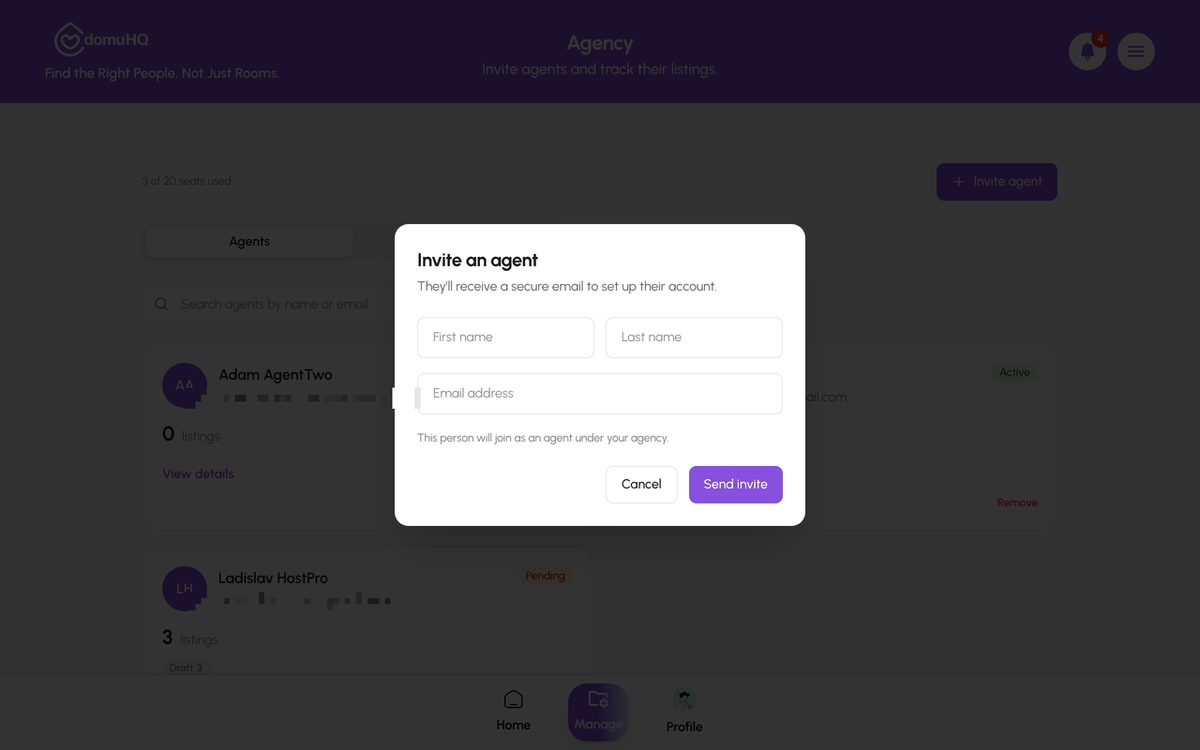
Manage, Invite agent: first name, last name, email, Send invite. The invitation appears under Pending until accepted (Resend or revoke from there). Each accepted agent uses one seat; when seats are full the button says You've used all your seats and you contact DomuHQ to add more.
What the agent sees
The agent gets an email and, if they already have a DomuHQ account, an Agency invitation in the app with Accept and Decline. Accepting turns their account into a Host account under the agency: their personal Roommate and Renter profiles are paused, their profile shows "You are an agent at [agency]" and "Subscription managed by your agency", and listings they publish are verified automatically. Agents have the full host toolset: Manage, Requests, Applications, Track Application, contracts.
Removing an agent
Manage, Agents, open the agent (View details) and choose Remove. Their listings stay with the agency and can be reassigned; the seat is freed.
Billing
The agency plan is invoiced to the agency; agents have nothing to pay and no billing screens. Plan changes go through your account manager.
Step-by-step
- 1
Complete Agency setup (web)
5 minutesOpen the link in the setup email, fill in the company details, and confirm.
- 2
Read the overview
1 minuteHome shows the counters, charts, seats, and the CRM Connection card.

- 3
Invite an agent
30 secondsManage, Invite agent: first name, last name, email, Send invite. Follow it under Pending.
- 4
Agent accepts
1 minuteThe agent accepts the invitation from the email or the Agency invitations screen in the app.

- 5
Connect your CRM (optional)
5 minutesOn the overview, CRM Connection: copy the Client ID and Generate password, then enter both in your Sreality-compatible software.
Frequently asked questions
Can an agent also be a renter or roommate?
Not on the same account while they are an agent; personal profiles are paused. They can create a separate personal account with another email.
How do I add seats?
Contact your DomuHQ account manager or sales@domuhq.cz; seats are part of the agency plan.
Which CRMs work?
Any system that exports in the Sreality format. The Client ID and import password from the overview are what the CRM asks for.
Related articles
Choose a professional host plan: Host Pro, Host Premium, Host Enterprise
One spare room fits the personal Host role on DomuPlus. Several properties need Host Pro (1 to 3 listings), Host Premium (up to 10, bulk upload, team tools) or Host Enterprise (unlimited, custom pricing). Free until 2027.
BeginnerVerify your business with IČO
Professional hosts and agencies verify the business once with their 8-digit IČO; after that every listing they publish carries the Verified badge automatically.
BeginnerBulk-upload listings from a spreadsheet
Host Premium and Host Enterprise can create up to 50 draft listings from one .xlsx file: download the template, fill one row per listing, upload, review the validation, create drafts, add photos, submit for review.
Intermediate