
Find roommate matches and connect
Browse your Top Compatibility Matches, filter Discover by budget, location, lifestyle, and verification, open a profile, tap Say Hello, and take it to chat once they accept.
Where matches live
- Home: Top Compatibility Matches, your highest-scoring people right now. Tap See All for the full list.
- Explore, Discover: everyone in your area, with a search box for names and a Filters button. The For You row at the top holds AI-Powered Matches (DomuPlus and above).
- Explore, Squad: groups looking for members; see Join a Squad, vote, and suggest apartments.
Reading a card
Each card shows the photo, a Verified or Unverified badge, the match percentage in the corner, the name, the city, and the budget range. Tap the card to open the full profile.
Filters
Filters has five groups: Budget Range CZK (5,000 to 50,000 per month), Age & Gender, Preferred Location, Lifestyle & Verification (lifestyle answers plus Verified only), and Move-in Timeframe. The button at the bottom shows how many people match ("Show 77 results").
The profile page
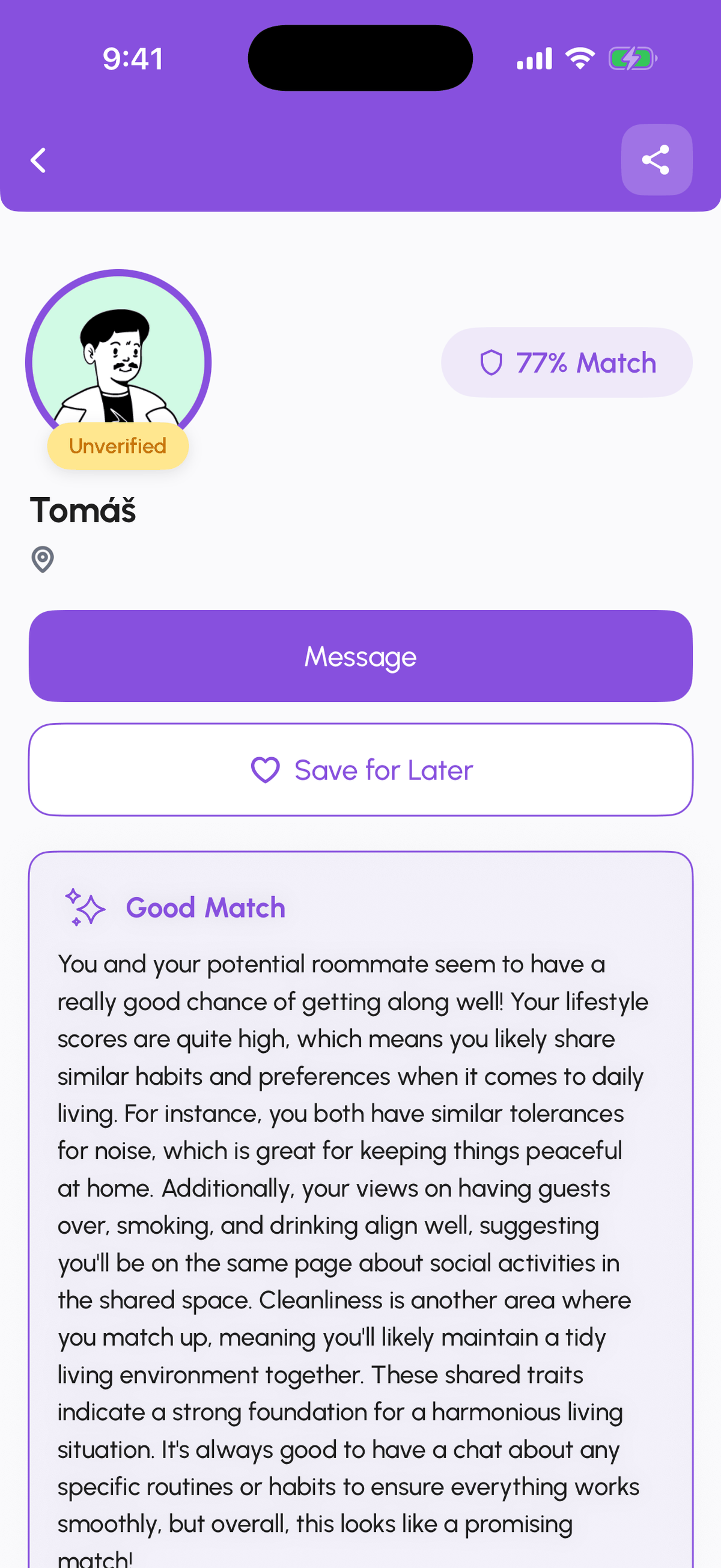
At the top: the photo, badge, name, and location, then two buttons, Say Hello and Save for Later, and the share icon in the corner. Below, the compatibility block shows the percentage and a written summary of where you align and what to talk about, with Show All Matches for the individual factors. Then the sections About Me, Pictures, What I'm Looking for, My Lifestyle Values and Boundaries, and Hobbies.
Sending a request
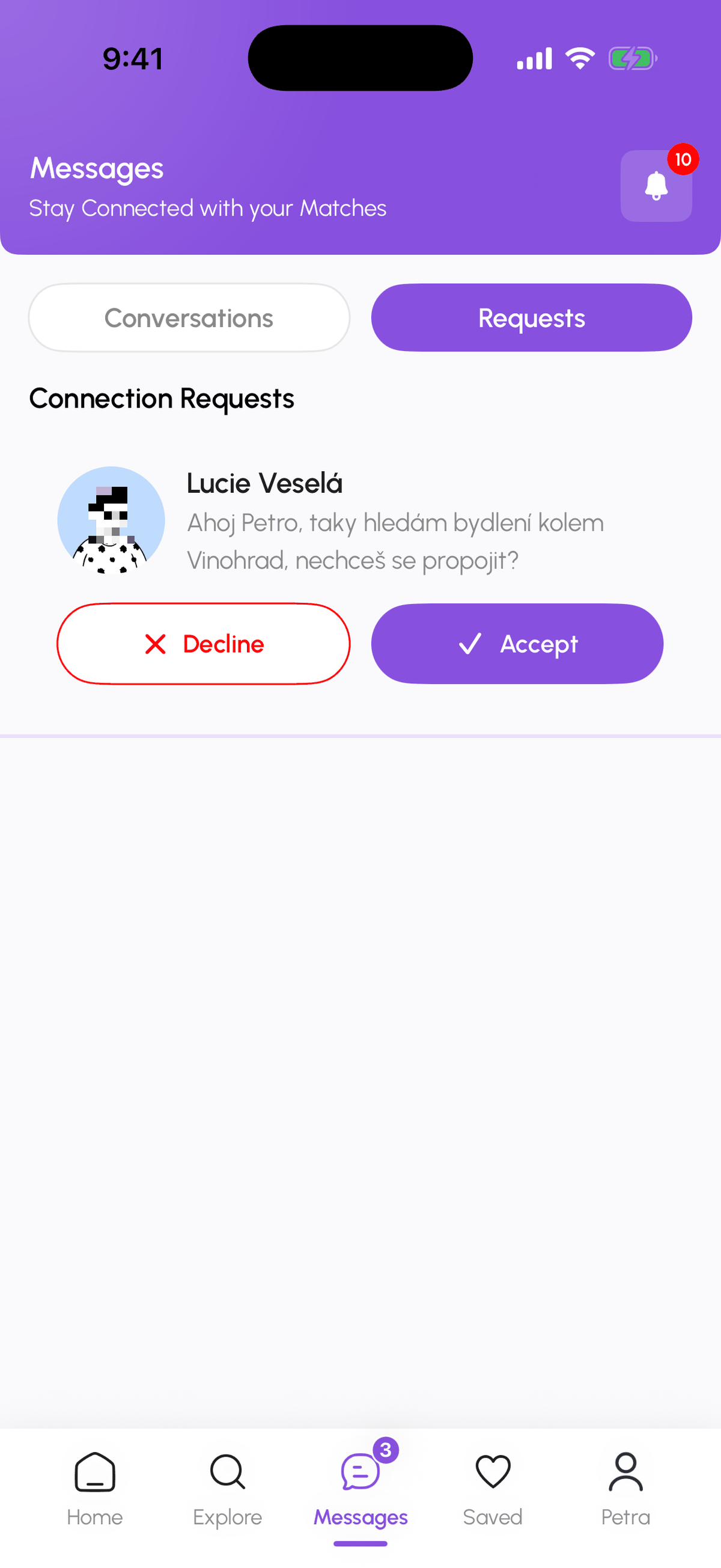
Tap Say Hello. The other person gets a notification and a card under Messages, Requests, with your budget range, move-in timeframe, compatibility score, interests, preferences, and dealbreakers, and the buttons Accept Connection and Decline Connection. You cannot message before they accept. There is no penalty for a declined request and the other person is not told when you decline theirs.
After they accept
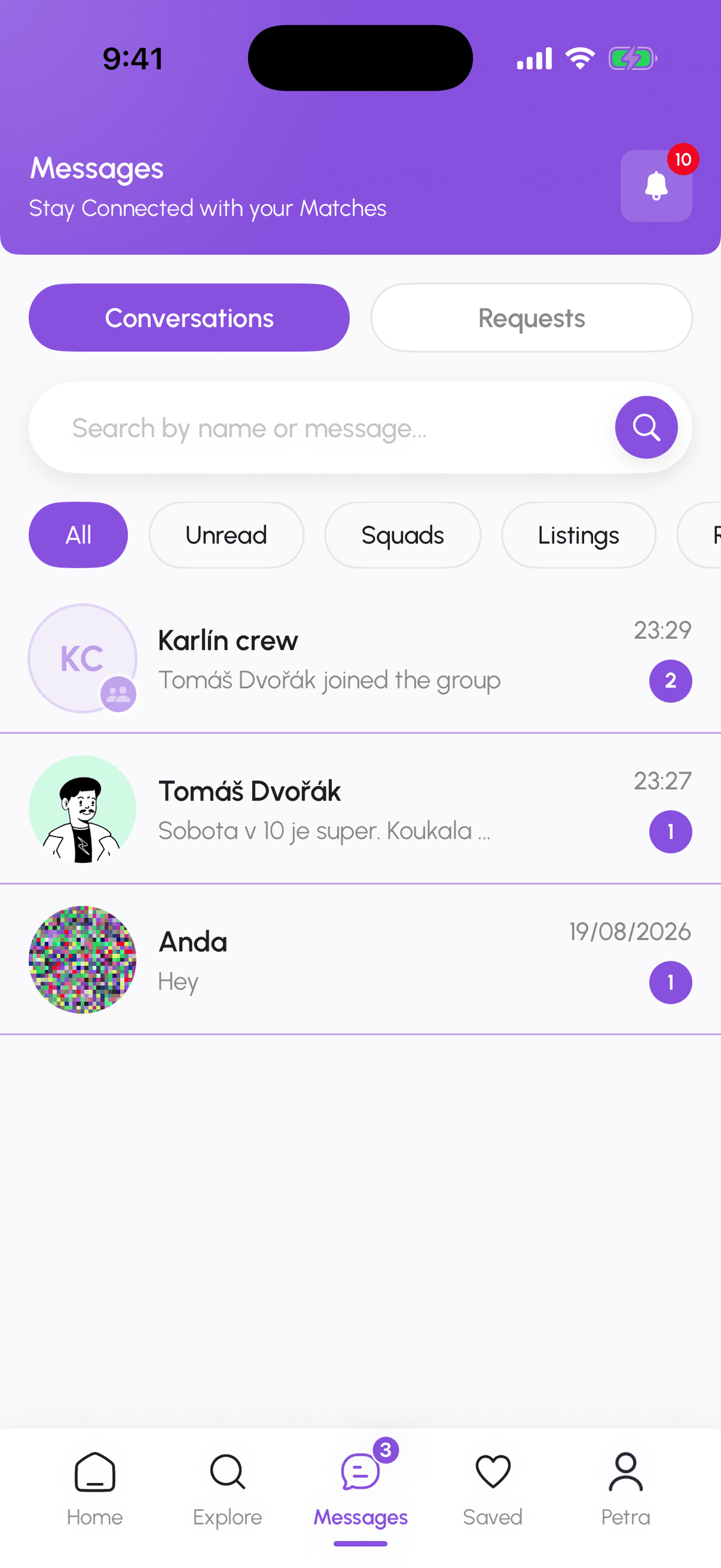
You get a Request Accepted notification and the conversation appears in Messages. Good opening messages use the data: "We match on quiet evenings but differ on guests, how often do you have people over?" beats "hi". Cover the basics early: schedule, cleanliness, guests, money, lease length. Aim for a coffee within the first week; in-person is the part no score can measure.
Want to rent together? In the chat header tap Squad Up to create a squad with this person or invite them to one of yours; see Messages, conversations, and requests.
Saving people
Save for Later adds the person to Saved, Saved Roommates. Collections (Add Category) let you group them, for example "Karlín shortlist". Saved is also where you find them again after closing the app.
Not a fit?
Open the conversation menu to Unmatch, Block User, or Report. Blocking removes you from each other's matches and messages. See Stay safe on DomuHQ.
Step-by-step
- 1
Browse Discover
1 minuteTap Explore, then Discover. Use the search box for a name or Filters to narrow the list.

- 2
Set your filters
1 minuteAdjust Budget Range CZK, Age & Gender, Preferred Location, Lifestyle & Verification, and Move-in Timeframe, then tap Show results.

- 3
Open a profile
2 minutesTap a card. Read the compatibility summary and the sections below before you decide.
- 4
Tap Say Hello
5 secondsThis sends the connection request. Save for Later if you want to come back to them instead.
- 5
Answer requests you receive
1 minuteMessages, then the Requests tab. Open a request to see the person's details and tap Accept Connection or Decline Connection.
- 6
Start the conversation
2 minutesAccepted connections appear under Conversations. Open one and write something specific.
Frequently asked questions
Why is the For You row locked?
AI-Powered Matches are a DomuPlus feature. Every plan is free until 2027, so open Profile, My Hub, Manage Subscription and switch to DomuPlus at no cost.
Can I see who sent me a request?
Yes, under Messages, Requests. Each request shows the sender's card, compatibility score, budget, timeframe, hobbies, preferences, and dealbreakers.
Is there a limit on requests?
No fixed number, but requests need DomuPlus or above and a verified identity, and repeated declined requests to the same person are blocked.
What does the share icon on a profile do?
It copies a link to the profile so you can send it to a friend or into your Squad chat.
What to do next
- Create a SquadA Squad is a group of 2 to 8 people who look for housing together. Pick Private, Open, or Semi-Open, set the budget and move-in window, add tags and application questions, and invite people from your matches.
- Messages: conversations, requests, and chat actionsHow the Messages tab is organised, what the filter chips mean, what the property chat header can do, and how to archive, pin, mute, block, or report a conversation.
Related articles
Complete your profile and get the Verified badge
Raise your Profile Score with a real photo, a bio, lifestyle details, and photos, then verify your identity with a government ID and a selfie to earn the Verified badge.
BeginnerStay safe on DomuHQ: scams, reporting, and blocking
Never pay before you have seen the place and met the host, keep the conversation on DomuHQ, and use Report and Block the moment something feels off.
BeginnerSave listings into collections and compare them side by side
The heart saves a listing; Saved keeps them in collections you name; Compare shows up to four listings in one table.
Beginner